


Video Subscription Services: 2026 Guide to Choice & Quality
Choosing video subscription services is easier when you compare how you actually watch, rather than focusing only on the advertised monthly price. This guide explains the main streaming models, seven checks to make before paying, and how to evaluate content, advertisements, devices, renewal terms, and provider transparency in the United States.
Quick Answer
The best video subscription service depends on the content you watch, your preferred viewing experience, your household’s devices, and your monthly budget. Compare on-demand libraries, live TV packages, channel add-ons, advertising restrictions, and cancellation terms before choosing a subscription.
Some services specialize in original movies and television series, while others provide scheduled channels, live sports, or multiple entertainment brands through one bundle.
Trust and Methodology
- Publisher: Xtreme HD IPTV
- Author: Xtreme HD IPTV Editorial Team
- Last updated: November 15, 2026.
- Research basis: Publicly available provider documentation, official subscription information, consumer guidance, and established streaming-industry publications.
- Evaluation criteria: Content availability, pricing structure, advertising, device compatibility, simultaneous streaming, billing transparency, and distribution rights.
- Testing disclosure: Documentation-based editorial research. No independent device testing, streaming-performance measurements, customer surveys, or service uptime tests were conducted for this article.
Table of Contents
1. Why Are Video Subscription Services Different?
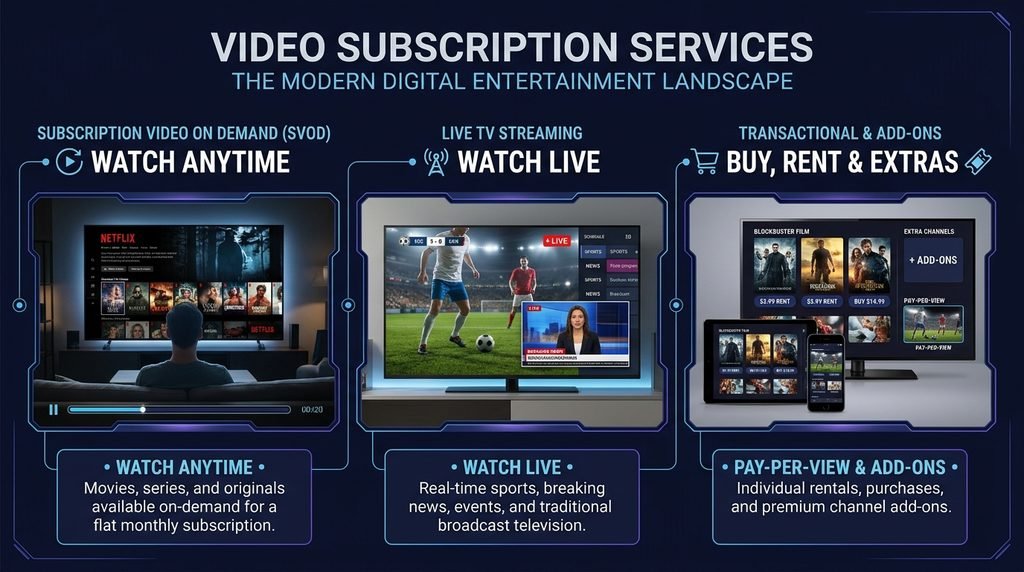
Video subscription services are digital entertainment platforms that provide access to movies, television programs, documentaries, sports, or live broadcasts through recurring payments.
However, not every streaming subscription operates in the same way.
Understanding the differences helps consumers avoid purchasing a service that does not provide the content they actually want.
Subscription Video on Demand
Subscription Video on Demand (SVOD) gives subscribers access to a library of movies and television programs that they can select whenever they want.
Popular examples include:
- Netflix
- Disney+
- Hulu
- HBO Max
- Apple TV
- Paramount+
The main advantage is viewing flexibility. Instead of following a traditional broadcast schedule, subscribers can select available titles through an application or website.
However, content availability changes. A movie available today might disappear when its distribution agreement expires.
Live TV Streaming
Live TV streaming provides access to television networks broadcasting on a scheduled basis over an internet connection.
Unlike conventional on-demand platforms, viewers generally select a channel and watch whatever is currently being broadcast.
Examples include YouTube TV, Sling TV, Hulu + Live TV, and Fubo.
YouTube TV describes its service as providing more than 100 broadcast, cable, and regional sports networks, together with cloud DVR functionality. Its simultaneous-streaming limits and other features depend on the current plan. YouTube TV Help
Live TV is particularly relevant to households that regularly watch news, sports, local television, and scheduled entertainment.
Channel Add-ons and Transactional Streaming
Some streaming platforms combine subscription libraries with additional purchasing options.
Amazon Prime Video illustrates this model particularly well. Its platform distinguishes between content included with a Prime membership, movie rentals, purchases, add-on subscriptions, and pay-per-view programming.
Importantly, add-on subscriptions can incur additional fees beyond the primary membership. digprjsurvey.amazon.com
This distinction matters when comparing services because a subscription does not necessarily include every title displayed in its application.
2. Which Types of Streaming Services Should You Compare?
The most useful comparison begins with the type of entertainment you want.
Entertainment and Movies
For viewers interested primarily in original programming, movies, documentaries, and television series, on-demand platforms are generally the appropriate category.
Examples include Netflix, Disney+, Apple TV, and HBO Max.
Before subscribing, investigate the actual content library, available titles, language options, and regional availability.
Do not assume that a title advertised by a platform is available in every country.
Live Television and Sports
People who prefer scheduled programs, television news, and live sporting events should prioritize live-TV services.
Consider:
- Whether your local television networks are available.
- Which sports competitions are included.
- Whether premium sports packages require additional payments.
- How much DVR storage is provided.
- How many screens can watch simultaneously.
A service with an attractive starting price may become expensive when several sports add-ons are necessary.
Free Streaming Alternatives
Paid subscriptions are not the only way to watch digital entertainment.
Free ad-supported streaming television (FAST) and ad-supported video-on-demand platforms provide programming without a conventional monthly subscription.
Examples include Tubi, Pluto TV, and The Roku Channel.
The trade-off is generally the presence of advertisements, and the available programming depends on the platform and region.
These services can complement paid subscriptions and help reduce the number of recurring payments a household needs.
3. What Are the 7 Essential Checks Before Subscribing?
The following seven-point framework provides a practical way to evaluate different platforms without depending on promotional rankings.
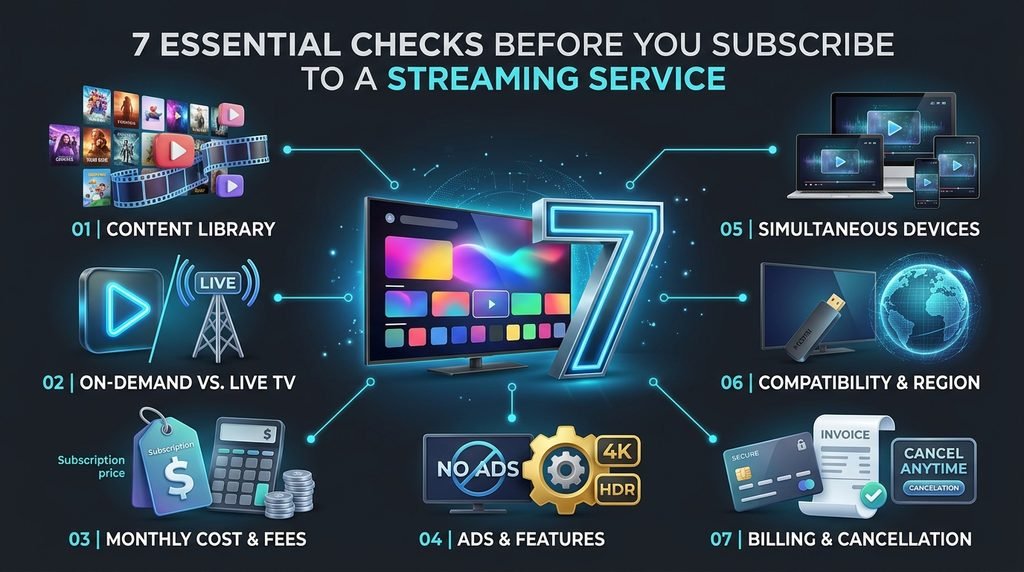
1. Does the Content Library Match Your Interests?
The most attractive platform is not necessarily the one with the largest catalogue.
A household that watches documentaries, another that prefers international movies, and a family interested in children’s programming will have different requirements.
Check the available catalogue before subscribing.
Pay particular attention to exclusive programming, regional availability, language preferences, and whether your frequently watched titles remain accessible.
Practical example: A household that regularly watches one particular television series might benefit more from a platform carrying that series than from a subscription with thousands of unrelated titles.
2. Do You Need On-Demand Entertainment or Live TV?
This is one of the most important purchasing decisions.
On-demand services allow viewers to select individual titles whenever they want. Live TV services follow scheduled programming and provide access to channels broadcasting in real time.
Some platforms combine both models.
Check whether a service includes the live channels you actually watch or whether those networks require an additional package.
Reviews.org also distinguishes scheduled live television from on-demand viewing in its 2026 streaming-service guide. Reviews.org
3. What Is the Real Monthly Subscription Cost?
An advertised starting price does not always represent the amount a household eventually pays.
Consider the complete subscription cost:
| Cost component | What to check |
|---|---|
| Main subscription | Recurring monthly or annual payment |
| Premium package | Additional channels or content |
| Advertising upgrade | Additional payment for fewer ads |
| Extra members | Additional household or account charges |
| Channel add-ons | Separate subscriptions within another platform |
| Taxes and billing fees | Amount charged at checkout |
Calculate the total using this simple formula:
Monthly streaming expenditure = Main subscriptions + Add-ons + Extra-member fees + Applicable charges.
Then multiply the monthly total by 12 to understand the annual commitment.
This calculation makes it easier to recognize subscription stacking.
A combination of several inexpensive services can become a substantial recurring expense.
4. Do the Advertising and Streaming Features Meet Your Expectations?
Different subscription tiers can provide different viewing experiences.
Some plans include advertising, while others offer fewer advertisements or ad-free on-demand libraries.
However, paying for an ad-free tier does not necessarily mean that every piece of content is completely free from promotional interruptions.
Check the terms associated with live programming, sports broadcasts, promotional trailers, and separately purchased channels.
Netflix’s official plan documentation, for example, explains that its plans differ in advertising, supported resolution, downloads, and simultaneous devices. Netflix Help Center
Also investigate:
- HD and 4K availability.
- HDR support.
- Offline downloads.
- Subtitles and audio languages.
- Parental controls.
- Accessibility options.
A premium package is worthwhile only when its additional features serve a real viewing need.
5. How Many Devices Can Stream Simultaneously?
A household should evaluate simultaneous-streaming limits before purchasing an account.
Some services allow several profiles but restrict the number of screens that can play content at the same time.
Netflix, for instance, lists different simultaneous-device allowances across its plans. Its account-sharing rules also distinguish household members from people living elsewhere. Netflix Help Center
Ask these questions:
- Can two family members watch different programs simultaneously?
- Are mobile phones and televisions counted separately?
- Does the subscription include additional household members?
- Are downloads available on multiple devices?
- Does upgrading increase the simultaneous-stream allowance?
Illustrative example: A family with three televisions and two smartphones may need more simultaneous connections than a single viewer living alone.
The number of installed applications does not tell you how many devices can play at once.
6. Is the Service Compatible With Your Devices and Location?
Before paying, confirm that the streaming application supports your equipment.
Common viewing devices include:
- Amazon Fire TV and Fire TV Stick.
- Android TV and Google TV.
- Apple TV.
- Roku.
- Samsung Smart TVs.
- LG Smart TVs.
- Windows and macOS computers.
- Android and iOS smartphones.
Compatibility is platform-specific, so verify the latest supported-device information on the provider’s official website.
Also check geographical restrictions.
Some services are limited to specific countries, while certain live channels, sporting competitions, and entertainment libraries depend on the viewer’s location.
A service working on a smartphone does not automatically mean that the same account will work with every smart television or streaming device.
7. Are Billing, Cancellation and Content Rights Transparent?
A subscription should clearly explain what the customer is purchasing.
Before submitting payment information, investigate the following:
- The legal or business identity of the provider.
- The recurring billing amount.
- Whether the subscription automatically renews.
- The cancellation procedure.
- The refund policy.
- Customer-support contact information.
- Any restrictions on devices or usage.
- The provider’s authorization to distribute the content offered.
The Federal Trade Commission advises consumers to understand free-trial conditions, renewal charges, cancellation requirements, and unexpected billing before committing to a subscription. Consumer Advice
There is another important consideration for live television and IPTV.
In the United States, copyright owners have exclusive rights that include public performance of audiovisual works and can authorize others to exercise those rights. A channel list or working streaming application does not independently establish that a distributor has the appropriate authorization. U.S. Copyright Office
For this reason, request clear information about the provider’s content-distribution rights rather than relying exclusively on promotional claims.
4. How Can You Compare Video Subscription Services?
The following comparison matrix is designed to help readers select the appropriate type of subscription.
Original editorial decision aid · Based on service models and documented features, not personal testing or customer ratings.
| Viewer profile | Service category to investigate | Important evaluation criteria |
|---|---|---|
| Movie enthusiasts | On-demand streaming | Movie catalogue, originals, 4K |
| Families | Family-oriented platforms | Parental controls, profiles, simultaneous streams |
| Sports viewers | Live TV and sports subscriptions | Regional networks, competitions, add-ons |
| News viewers | Live television | Local channels, national networks |
| Budget-conscious viewers | Free and ad-supported platforms | Advertising frequency, available titles |
| International audiences | Regional and international streaming | Geographic access, languages, rights |
| Multi-device households | Multi-screen subscriptions | Simultaneous connections, compatibility |
The seven-point purchase decision
Use this checklist before purchasing any new package:
- The service includes the programs I regularly watch.
- The viewing model matches my preferences.
- I understand the complete recurring cost.
- I know whether advertisements are included.
- The simultaneous-screen allowance is sufficient.
- My devices and location are supported.
- Billing, cancellation, and content rights are transparent.
A service that meets all seven criteria is a stronger candidate than one selected solely because of its advertised channel count or promotional discount.
5. Where Does IPTV Fit Into the Streaming Market?
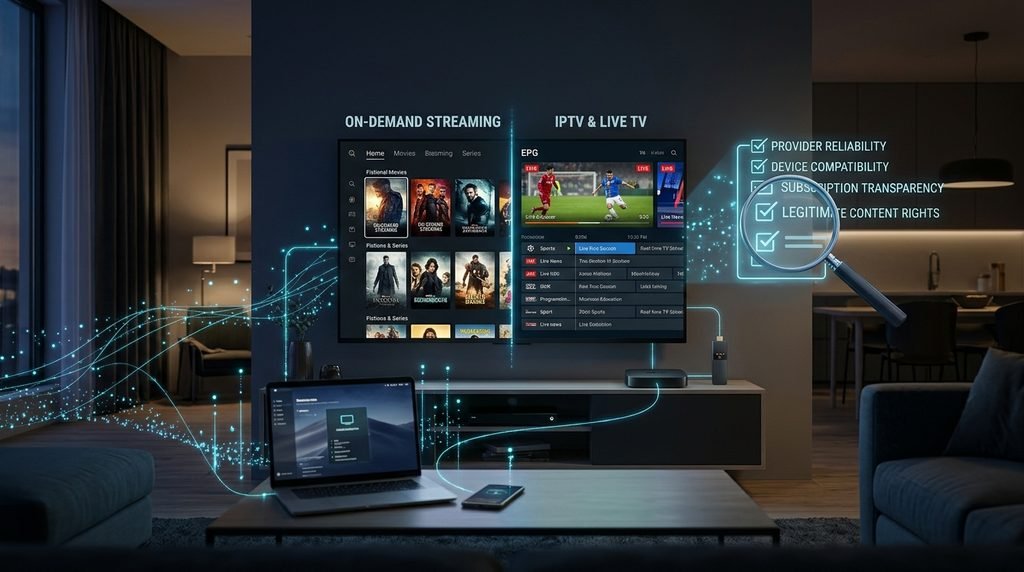
Internet Protocol Television (IPTV) describes the delivery of television programming through internet protocol networks.
It is a delivery technology, not a guarantee that every provider or channel package is authorized or reliable.
IPTV services can offer live television, international channel packages, and video-on-demand functionality. However, the availability of those features varies between providers.
Understanding the Difference Between IPTV and Streaming Apps
A streaming application and an IPTV provider are not necessarily the same thing.
For example, TiviMate is a third-party media player. It does not supply television channels or an IPTV subscription by itself.
A user needs a separate playlist source to access programming through a compatible player. Xtreme HD IPTV explains this distinction in its TiviMate installation and setup guide.
The distinction helps consumers understand which company provides the content, which application plays it, and who is responsible for account support.
Evaluating Xtreme HD IPTV
Xtreme HD IPTV is the publisher brand associated with this guide.
Readers evaluating this brand or any other IPTV provider should examine the actual subscription conditions, supported devices, billing arrangements, available content, and content-distribution authorization before purchasing.
The publisher provides additional information through its Xtreme HD IPTV channel directory and streaming channel lineup guide.
These pages describe the publisher’s stated channel information. They should not be interpreted as independent confirmation of licensing, continuous availability, or measured streaming performance.
A careful buyer should independently clarify any unanswered questions before committing to a subscription.
6. How Can You Reduce Your Monthly Streaming Costs?
Streaming subscriptions become easier to manage when they are treated as recurring household expenses rather than occasional entertainment purchases.
Here are practical strategies.
Rotate subscriptions. Subscribe to one platform while watching its current selection, then consider switching to another when your viewing priorities change.
Compare bundles. A bundle may cost less than separate memberships, but only when you regularly use the included services.
Choose the appropriate tier. Paying for the highest resolution or most simultaneous streams is unnecessary when your equipment and viewing habits do not require them.
Review automatic renewals. Check your billing statements and cancel subscriptions that are no longer useful.
Use free alternatives. Free ad-supported streaming services can provide additional entertainment without another paid membership.
Keep track of payment dates. Maintain a simple list of platforms, renewal dates, prices, and cancellation methods.
The FTC recommends checking promotional renewal prices and keeping records of cancellation requests and unexpected charges. Consumer Advice
A subscription audit every few months can help identify services that are no longer providing sufficient value.
7. Frequently Asked Questions
What are video subscription services?
Video subscription services provide access to streaming movies, shows, or live programming for a recurring fee. Some plans include ads, and some charge extra for premium channels or add-ons.
What is the difference between on-demand and live TV streaming?
On-demand streaming allows viewers to select available programs whenever they want. Live TV follows scheduled channel programming, including news, sports, and entertainment broadcasts.
Are free ad-supported streaming apps subscription services?
No. Free ad-supported streaming platforms generally do not require a paid recurring membership. Instead, they finance their programming through advertising.
How do I calculate the real monthly cost of streaming?
Add together your main subscriptions, premium upgrades, channel add-ons, extra-member fees, and applicable charges. Multiply the resulting monthly total by 12 to estimate your annual expenditure.
Does IPTV technology prove that a provider has distribution rights?
No. IPTV describes the delivery method, not content ownership or licensing. Ask the provider for clear information about its authorization to distribute the channels and programming it offers.
Does deleting a streaming app cancel the subscription?
No. Deleting an application or signing out does not necessarily stop billing. Cancel through the service or billing partner, save the confirmation, and check your next statement.
Sources and Further Reading
- Reviews.org – Best On-Demand Streaming Services of 2026 — On-demand versus live TV and subscription evaluation.
- Tom’s Guide – The Best Streaming Services in 2026 — Streaming categories, service comparisons, and evaluation methodology.
- Netflix Help Center – Plans and Pricing — Official plan features and household restrictions.
- YouTube TV Help – What Is YouTube TV? — Official live-TV features.
- Amazon Prime Video – What Can I Watch? — Included programming, rentals, add-ons, and PPV.
- FTC – Free Trials and Automatic Renewals — Consumer subscription precautions.
- U.S. Copyright Office – What Is Copyright? — Copyright ownership and exclusive rights.
Next-step block
Before choosing a subscription, compare the actual content, total cost, device allowance, and cancellation conditions.
