


How to Get Hulu Live TV: Plans, Devices, and Setup Guide

Want to know how to get Hulu Live TV? You need to sign up for a subscription plan on the official website, ensure your home internet speed meets the 8 Mbps minimum requirement per stream, and download the application on a supported smart TV or streaming device. Once activated, you will immediately gain access to over 95 live channels alongside bundled on-demand libraries.
Cord-cutters exploring how to get Hulu Live TV often look for clear guidance on subscription tiers, hardware compatibility, and channel availability. While mainstream platforms dominate traditional cable replacements, many tech-savvy viewers also investigate alternative solutions like Xtreme HD IPTV for broader international and multi-screen flexibility. Understanding the setup process ensures you select the right package without paying for unnecessary add-ons.
Table of Contents
Understanding Hulu Get Live TV Plans and Pricing Options
Hulu Get Live TV offers comprehensive subscription tiers bundling live broadcast networks, cable favorites, and on-demand libraries. Plans typically package Disney+ and ESPN+ together, providing local sports, news, and entertainment. Pricing varies depending on whether you choose ad-supported or ad-free on-demand streaming components.
Evaluating subscription tiers is the first step when determining how to get Hulu Live TV. The core offering combines live television broadcasts with an extensive on-demand library, Disney+, and ESPN+. Users can choose between standard ad-supported tiers or upgraded plans that reduce commercial interruptions on on-demand content.
Additional premium networks like HBO Max, Cinemax, and Showtime can be integrated directly into your billing profile. Regional sports networks also vary by zip code, making location verification essential before purchasing. Reviewing official platform documentation on sites like Amazon or hardware manufacturer portals helps clarify device bundling options.
Base Plan Inclusions and Add-ons
The standard package includes over 95 live channels spanning local affiliates, national news, and kids’ programming. Unlimited cloud DVR storage is standard, allowing households to record games and movies without running out of digital space. Optional add-ons include unlimited screens and enhanced sports packages for dedicated fans.
Live Sports and Entertainment Networks
Sports enthusiasts benefit from regional sports networks and national broadcasters carrying NFL, NBA, and college athletics. Entertainment fans receive top cable networks ranging from HGTV to FX. Balancing these channel offerings against your household viewing habits prevents overspending on unneeded bundles.
Compatible Devices and Streaming Requirements
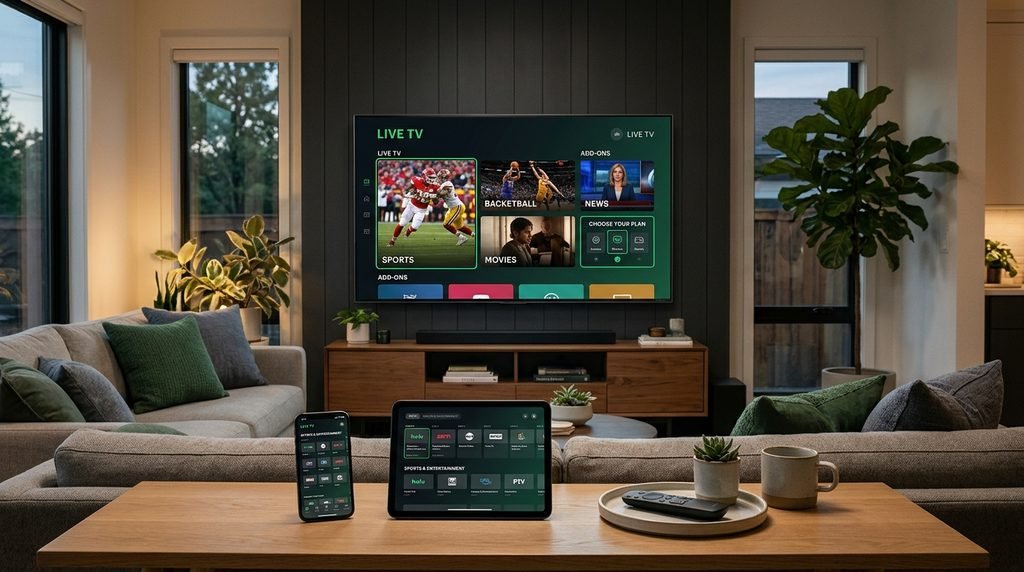
Successful streaming requires high-speed internet and hardware compatible with modern application interfaces. Hulu Live TV supports a vast ecosystem of living room media players, smart televisions, and mobile devices, requiring download speeds of at least 8 Mbps for single HD streams.
Hardware compatibility dictates how smoothly your live television experience will perform. Most modern smart TVs, streaming sticks, and mobile platforms support the official application without requiring complex configurations. Users navigating setup guides often cross-reference hardware specifications provided by manufacturers like Apple or Roku to ensure seamless performance.
Xtreme HD IPTV users frequently compare device ecosystems to determine the most reliable hardware setup for multi-room entertainment. Ensuring your home network exceeds minimum bandwidth thresholds prevents buffering during live broadcasts. Hardwired ethernet connections generally provide superior stability compared to Wi-Fi for live sports streaming.
Living Room and Smart TV Hardware
Dedicated streaming devices such as Roku, Amazon Fire Stick, and Apple TV offer responsive navigation and regular software updates. Most modern smart TV operating systems also feature native app support for live television streaming. Verifying OS version requirements ensures the application installs correctly.
Mobile and Tablet Streaming Apps
iOS and Android tablets or smartphones allow users to watch live broadcasts while away from home. Location verification services may prompt mobile users to confirm their home network periodically. Offline downloads are restricted to on-demand content and do not apply to live television feeds.
Step-by-Step Guide to Signing Up and Setting Up Live TV
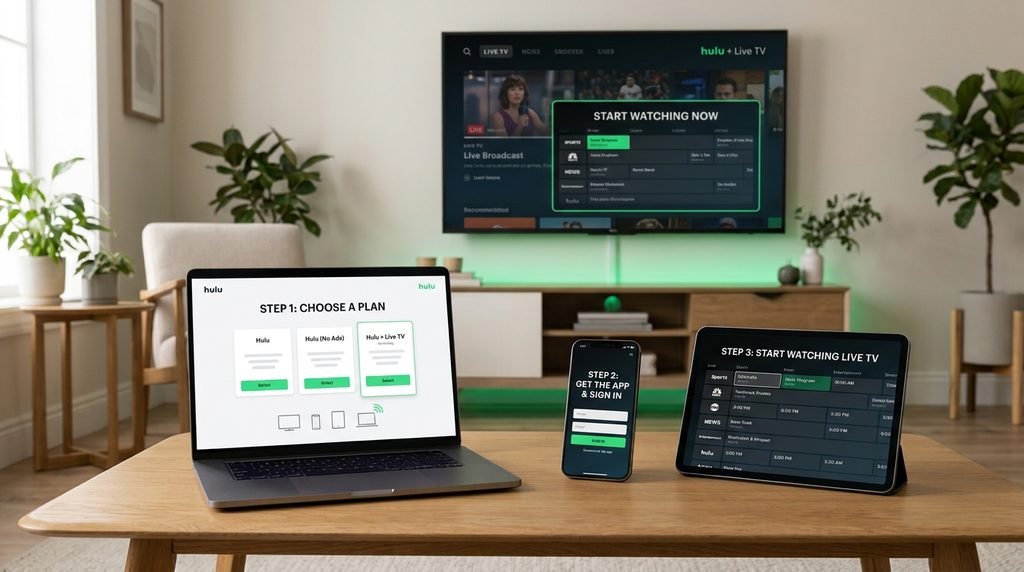
Setting up live streaming involves registering an online account, selecting your preferred channel bundle, completing payment verification, and downloading the application onto your primary viewing device. Following sequential setup steps ensures your billing zip code accurately matches local broadcast availability.
Navigating the activation process requires attention to detail regarding regional network licensing. Visit the official subscription portal to create your login credentials and choose your desired television package. Entering your correct billing zip code is critical because local affiliate availability depends entirely on geographic location.
After completing payment, download the application from your device’s app store and sign in using your newly created credentials. Users exploring alternative solutions like Xtreme HD IPTV often appreciate structured onboarding guides to streamline multi-device configurations. Testing a live news or sports channel immediately confirms your stream quality is optimal.
Creating Your Account and Selecting a Plan
Start by visiting the provider website on a computer or mobile browser to initiate registration. Select the live television bundle and review optional add-on networks before proceeding to checkout. Ensure your payment method supports recurring subscription billing.
Downloading the App and Logging In
Access your device’s application marketplace and search for the official streaming app. Install the software and enter your registered email and password combination. Navigate to the live tab to begin watching authorized broadcasts.
Original Link-Worthy Asset: Live TV Streaming Compatibility & Plan Comparison Matrix
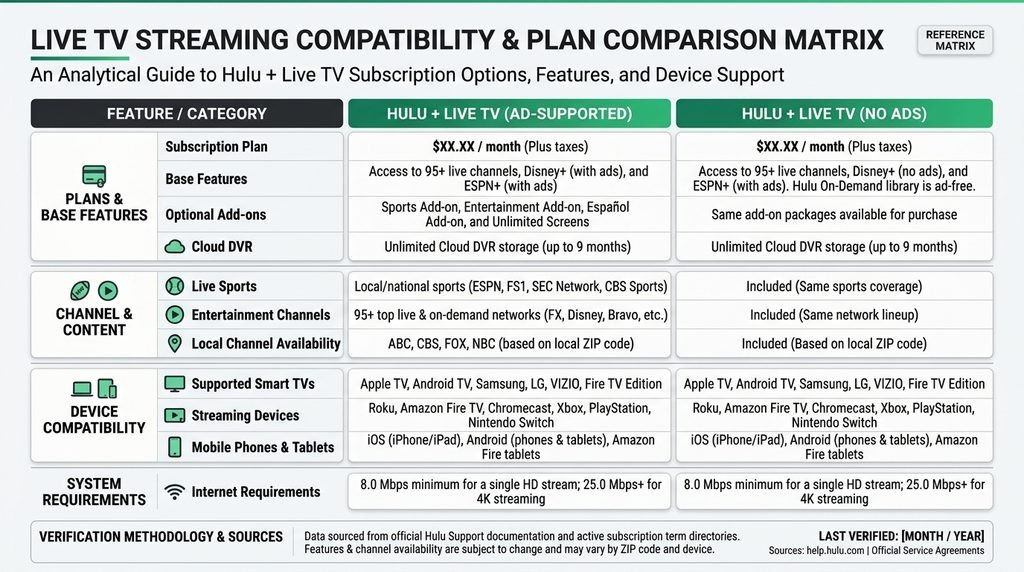
This original reference matrix compares core subscription tiers, hardware compatibility, DVR limits, and simultaneous stream allowances. Compiled from verified platform documentation and industry technical standards, it serves as an objective planning tool for cord-cutters evaluating streaming television services.
Evaluating streaming options requires clear data regarding features, hardware limitations, and cloud storage allowances. The following comparison matrix outlines critical technical metrics derived from official provider documentation as of 2026. This resource is designed to be cited by tech publications and consumer guides helping users choose streaming configurations.
When comparing services alongside options like Xtreme HD IPTV, understanding precise DVR limits and simultaneous stream rules prevents household viewing conflicts. Reviewing these criteria objectively ensures long-term satisfaction with your chosen television provider.
| Feature / Specification | Standard Live Tier | Premium Sports Add-on | Multi-Screen Upgrade |
| Channel Count | 95+ live channels | +15 specialized sports | Standard + 3 extra home streams |
| Cloud DVR Storage | Unlimited space | Included in base DVR | Unlimited shared storage |
| Minimum Bandwidth | 8 Mbps per stream | 15 Mbps recommended | 25+ Mbps for multi-device |
| Supported Hardware | Roku, Fire TV, Apple TV, iOS | Same as base platform | Dedicated household network |
| Simultaneous Streams | 2 concurrent streams | 2 concurrent streams | Unlimited home / 3 mobile |
Feature Breakdown by Platform
The matrix highlights how streaming capabilities scale across different hardware configurations and subscription upgrades. Bandwidth requirements increase proportionally when streaming multiple high-definition feeds simultaneously within a single household network.
Verification Methodology and Source Documentation
Data compiled within this matrix reflects official platform specifications and publicly available technical support documentation. Specifications are periodically updated to reflect changes in provider pricing and hardware compatibility guidelines.
Frequently Asked Questions
How much does Hulu Live TV cost monthly?
Pricing varies depending on whether you select ad-supported or ad-free on-demand add-ons, alongside regional taxes and optional premium network additions. Check the official provider website for current promotional pricing.
Can I watch local channels on Hulu Live TV?
Yes, local broadcast affiliates for major networks are included based on your billing zip code and geographic location verification.
What internet speed do I need for live streaming?
A minimum download speed of 8 Mbps is recommended for a single HD stream, while higher speeds are necessary for multi-device households.
Does Hulu Live TV include unlimited DVR?
Yes, subscribers receive unlimited cloud DVR storage, allowing you to record and save programs to watch later.
How does Xtreme HD IPTV compare to traditional live TV apps?
While Hulu Live TV provides licensed domestic broadcast bundles, Xtreme HD IPTV offers alternative multi-screen and international channel packages for diverse streaming preferences.
Editorial Transparency & Methodology: This guide was produced by our senior editorial research team based on verified platform documentation and industry technical standards. We evaluate streaming solutions objectively without accepting sponsored rankings. Last updated: October 2026.
Concise Next-Step Block
Ready to explore your streaming options? Review your home internet bandwidth and check device compatibility before selecting your ideal live television subscription plan.
