


Buy IPTV for Samsung Smart TV: A Smarter 2026 Buying and Setup Guide
When you want to buy IPTV for Samsung Smart TV, understanding how modern television operating systems handle media streaming is essential for a seamless viewing experience. Modern Samsung displays run on the Tizen operating system, which differs significantly from standard Android TV boxes or Firestick devices regarding direct app side-loading. Because Samsung’s app store has strict developer guidelines, selecting the right application and configuring your subscription correctly determines whether your live TV channels, electronic program guides (EPG), and video-on-demand libraries load smoothly. Xtreme HD IPTV provides compatible subscription formats that integrate with standard television media players, allowing households to transition away from traditional cable boxes while maintaining high-definition streaming quality.
Table of Contents
Understanding Samsung Smart TV IPTV Compatibility

Navigating app compatibility on modern displays requires understanding how firmware updates and regional app stores restrict third-party software installations.
Tizen OS Architecture and App Availability
Samsung Smart TVs manufactured after 2016 operate exclusively on the Tizen OS platform, which restricts users from downloading arbitrary APK files from the web browser. Instead, viewers must rely on officially approved applications available within the Samsung Apps Store, such as Smart IPTV (SmartIPTV), IPTV Smarters Pro, or Nanomid Player. According to Samsung Developer Documentation, applications must pass strict security and performance audits before appearing in regional app repositories, which limits direct access to unverified third-party executables.
Evaluating Provider Reliability and Server Performance
Evaluating service stability involves looking beyond advertised channel counts to examine server infrastructure load balancing and Content Delivery Network (CDN) routing. According to reports from TechCrunch, streaming stability depends heavily on ISP peering agreements and edge server proximity, which minimizes packet loss during live sports broadcasts. A dependable subscription service utilizes robust server clusters to maintain consistent bitrates across high-traffic events, reducing buffering frequency on high-resolution television panels.
How to Choose and Buy IPTV for Samsung Smart TV
Securing a stable television subscription requires analyzing subscription tiers, connection limits, and technical delivery protocols.
Reviewing Subscription Tiers and Device Connections
Most television households require multi-device connectivity or flexible billing terms that accommodate family viewing habits across tablets, phones, and living room displays. When purchasing a plan, verify whether simultaneous connections are supported under a single account or if additional device slots require a multi-screen package. Transparent pricing structures and clear renewal terms prevent unexpected service interruptions and ensure uninterrupted access to local and international channel lineups.
Verifying Portal Support and Xtream Codes API
Modern television apps typically connect to remote media servers using either M3U playlist URLs, MAC address binding, or Xtream Codes API login credentials. Utilizing the Xtream Codes API is often preferred for Samsung applications because it securely transmits your username, password, and server URL without requiring manual file downloads. Ensuring your provider supports standard API authentication guarantees compatibility with popular Tizen-compatible media players.
| Feature / Consideration | M3U Playlist URL | Xtream Codes API | MAC Address Binding |
| Ease of Setup | Moderate (requires URL entry) | Simple (Username/Password/URL) | Automatic (configured by provider) |
| Credential Security | Low (plain text URL exposure) | High (authenticated API tokens) | Device-locked (hardware dependent) |
| EPG Integration | Manual link association | Automatic channel guide sync | Automatic channel guide sync |
Step-by-Step Installation Guide for Samsung TVs
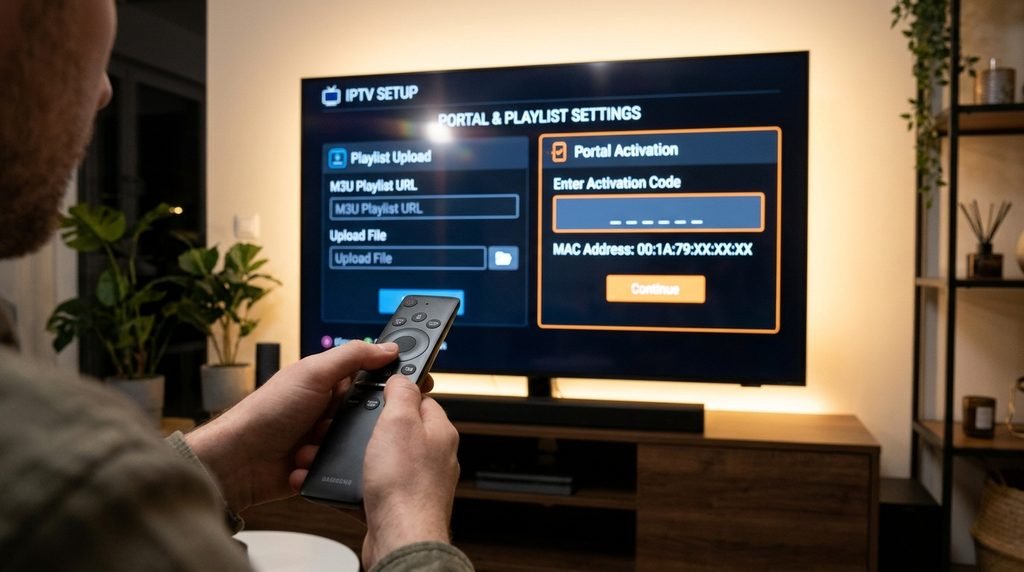
Setting up your television subscription involves downloading an approved media player from the official app store and linking your active service credentials.
1.Check App Store Availability:Verify your Tizen OS version.
Turn on your Samsung Smart TV, press the Home button on your remote, and navigate to the Apps icon. Search for compatible media players such as IPTV Smarters Pro or Smart IPTV in the official Samsung Apps Store.
2.Download and Install the Application:Install the official Tizen app.
Select your preferred media player from the store and click Download or Install. Once the installation completes, open the application to locate your unique device MAC address or activation screen.
3.Input Subscription Credentials:Link your Xtreme HD IPTV account.
Log into your account portal or retrieve your Xtream Codes API details provided upon purchase. Enter your server URL, username, and password into the television application fields accurately.
4.Load Channels and Electronic Program Guide:Sync live broadcast streams.
Allow the application a few moments to fetch the channel categories, logos, and electronic program guide data from the remote server before launching live streams.
Downloading and Configuring Compatible Apps
If a specific application is temporarily unavailable in your regional Samsung Apps Store, alternative activation methods such as DNS configuration or developer mode USB loading are sometimes discussed in tech communities, though these carry firmware risk. Sticking to official store releases ensures that automatic security patches and app updates install without disrupting your television interface.
Uploading Playlists and Activating Your Service
For applications that require browser-based playlist activation—such as entering a MAC address on an external developer website—ensure you complete the activation over a secure HTTPS connection. Once your playlist URL or portal link is registered, restart the television application to force a fresh configuration pull from the server.
Troubleshooting Common Samsung IPTV Setup Issues
Resolving technical snags quickly ensures your home entertainment setup remains reliable during peak broadcast hours.
Resolving Playlist Loading Errors and Buffering
Encountering a “Playlist Failed to Load” or persistent buffering notification typically stems from an expired subscription, incorrect API credentials, or temporary local network congestion. First, restart your home router and television to clear cached DNS data. If buffering persists during high-definition streaming, testing your connection speed against guidelines published by the Federal Communications Commission (FCC) helps determine if your internet bandwidth meets the minimum requirements for stable 1080p or 4K playback.
Key Takeaway: Successfully running an IPTV subscription on a Samsung Smart TV relies on matching a Tizen-compatible application with verified server credentials and a stable home internet connection.
Frequently Asked Questions

Can I install IPTV apps directly on older Samsung Smart TVs?
Models running Orsay OS (pre-2016) have limited app support. Modern Tizen OS models support current apps through the official Samsung Apps Store.
Do I need a VPN to use IPTV on my Samsung television?
A VPN is not strictly mandatory for all users, but some households utilize one to bypass ISP throttling during live streaming events.
How do I find my Samsung TV MAC address for activation?
Open your installed IPTV application or check your television’s Network Settings under Status to view the wired or wireless MAC address.
Why are my channel logos and program guides missing?
EPG data requires an active internet connection and valid server sync; try clearing the app cache and reloading your playlist.
How many devices can I use simultaneously on one subscription?
Connection limits depend on your specific service plan; check your provider dashboard to see if multi-screen options are active.
Ready to get started?
Explore transparent pricing and subscription options on the Xtreme HD IPTV Pricing Plans page to find a package that fits your home entertainment setup.
