


Where To Buy Xtream-Code-IPTV Services: A Best 2026 Buyer Guide

Searching for where to buy Xtream Code IPTV services? The first step is finding an IPTV subscription provider that explicitly supports Xtream Codes API login, not purchasing an application or the Xtream Codes software itself.
Xtreme HD IPTV publishes subscription options and a free-trial request page on its website. Before purchasing, compare the published plans, confirm the exact login method, and check whether the provider can demonstrate authorization to distribute the content it advertises.
Quick Answer:
You can purchase an Xtream Codes-compatible IPTV subscription directly from a provider that supplies a server URL, username, and password. Xtreme HD IPTV publishes its available plans at its pricing page and offers a free-trial request. Always verify the provider’s identity, content rights, and subscription conditions before paying.
Editorial trust and methodology
- Author: Xtreme HD IPTV Editorial Team.
- Research basis: Publicly accessible provider pages, published subscription details, technical IPTV documentation, and government and industry intellectual-property resources.
- Evaluation criteria: Login compatibility, subscription pricing, business transparency, content authorization, customer support, trial conditions, and refund terms.
- Hands-on testing: No independent server-performance, channel-availability, or streaming-quality tests are claimed in this article.
- Last updated: November 4, 2026.
Table of Contents
What Does ‘Where To Buy Xtream-Code-IPTV Services’?
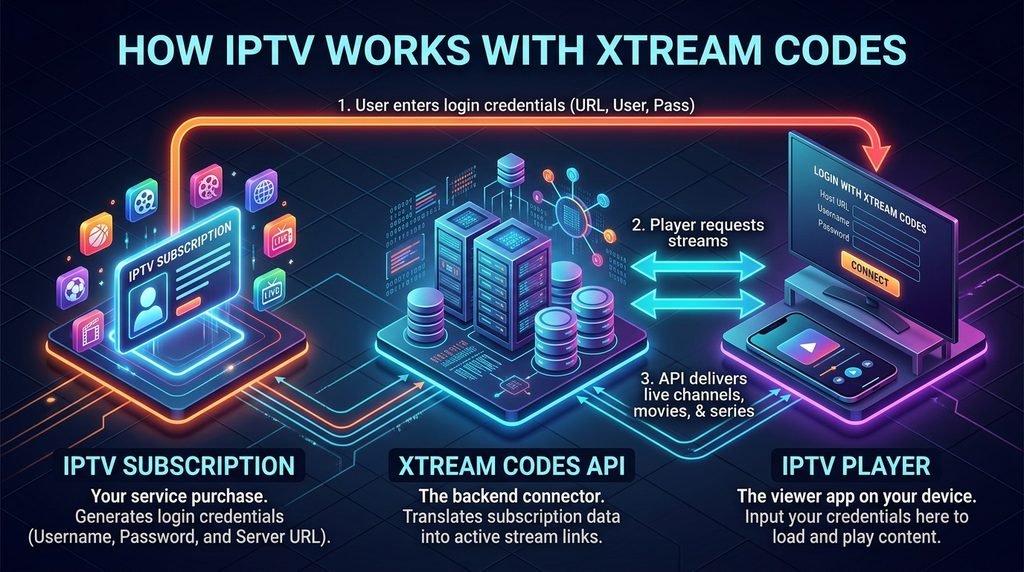
Xtream Codes is associated with IPTV server management and API-based authentication. It is not a television channel package that consumers purchase independently, nor is it a standalone media player.
The distinction matters because some websites advertise Xtream Codes, Xtream IPTV, and IPTV subscriptions as though they are interchangeable products.
They are different parts of the viewing process.
Xtream Codes API vs. IPTV subscription vs. player
An IPTV subscription is the service that provides access to a particular content lineup. An IPTV player is the application used to organize and play the streams.
Xtream Codes API is one method used to connect compatible players with an IPTV provider’s server.
Here is how the three elements differ:
| Component | What it does | Where you obtain it |
|---|---|---|
| IPTV subscription | Provides access to the provider’s available channels and content | From an IPTV provider |
| Xtream Codes API | Provides a login method for compatible services and applications | Through the provider’s credentials |
| IPTV player | Organizes and plays content supplied by a source | Through an application store or developer |
For example, a customer might purchase a subscription from Xtreme HD IPTV and use a compatible player on an Android TV device.
The customer would receive subscription credentials from the provider and enter them into the selected application.
This is why searching for an Xtream Codes application when you actually need an IPTV subscription can lead to the wrong purchase.
The European Union Intellectual Property Office (EUIPO) discusses Xtream Codes in its 2024 research into applications and infrastructure associated with intellectual-property infringement. Its report describes the technology as a platform used by IPTV providers to manage access and streaming services. euipo.europa.eu+1
What credentials should a provider supply?
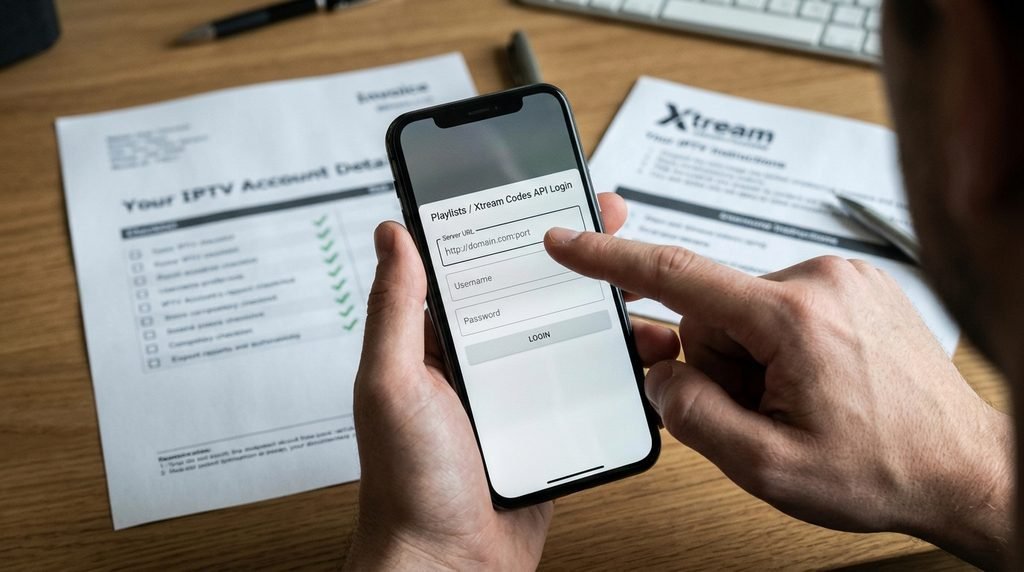
An Xtream Codes-compatible provider will generally supply three essential pieces of information:
| Credential | Purpose |
|---|---|
| Server URL | Identifies the provider’s server or portal |
| Username | Identifies your subscription account |
| Password | Authenticates your account |
Some providers send these details separately, while others provide a complete playlist URL.
For technical background, the community-maintained Xtream Codes format documentation on GitHub describes the common server, port, username, and password structure.
Keep these credentials private. Anyone who obtains your account details may be able to attempt to access your subscription.
Why the distinction matters
Consider two different shopping situations.
A customer finds an application advertised as an Xtream player and pays for its premium features. However, the application does not necessarily include a television subscription.
Another customer purchases an IPTV subscription but does not receive a compatible application or installation instructions.
Both situations can produce unnecessary expenses.
Before making a payment, confirm whether the advertised price covers the actual content subscription, the player application, activation, or some combination of these products.
Where Can You Buy Xtream Code IPTV Services?
You can purchase an Xtream Codes-compatible subscription through an IPTV provider’s website, provided that the provider supplies the required login format and can demonstrate that it is authorized to distribute its advertised content.
For a US customer, buying directly from a provider with clear subscription terms is generally easier to verify than purchasing anonymous access credentials through an unknown reseller.
Buying directly from an IPTV provider
A direct purchase gives you an opportunity to examine the provider’s website, pricing structure, trial conditions, refund policy, support channels, and subscription details before making a commitment.
Look for a website that explains:
- What the subscription includes.
- Which devices and applications are supported.
- Whether Xtream Codes API login is available.
- How many simultaneous connections are included.
- How long account activation takes.
- How renewals, cancellations, and refunds work.
Avoid making a purchase based entirely on an advertisement or a message from an unverified social media account.
A legitimate commercial relationship should have understandable terms and an identifiable party responsible for delivering the service.
What Xtreme HD IPTV currently publishes
Xtreme HD IPTV provides a dedicated subscription section where visitors can inspect its advertised plans.
Xtreme HD IPTV
Published one-connection pricing observed November 4, 2026
| Subscription | Published total |
|---|---|
| 1 month | $15.99 |
| 3 months | $34.99 |
| 6 months | $59.99 |
| 12 months | $79.99 |
These are the prices displayed for one simultaneous connection on the pricing page. Other connection configurations may have different totals. xtrmehdiptv.us
View pricing plans Request free trial
The website also publishes a dedicated channel list so prospective customers can review the advertised content categories.
One important point deserves attention: the website’s public pages currently display different channel and VOD totals. The homepage, pricing page, and FAQ do not consistently report the same figures. These are publisher claims, not independently verified channel inventories. Confirm the exact package contents before subscribing. #1 Official IPTV in USA 2026+2
The FAQ also states that subscriptions can be delivered with M3U playlist URLs or Xtream Codes API credentials. Confirm the credentials supplied with your selected plan before paying. xtrmehdiptv.us
Useful internal resources:
For additional information, visit the Xtreme HD IPTV official website verification guide, the free trial page, and the contact page.
These pages provide the publisher’s own information. They should not be treated as independent proof of content licensing or measured streaming performance.
How to avoid confusing official websites and resellers
One issue with the Xtreme HD IPTV name is that multiple websites use similar branding and make their own claims about being official.
A website using the same brand name, logo, or advertised channel figures does not automatically establish that it belongs to the same business.
Before paying:
- Confirm the exact domain you intend to use.
- Compare the domain with the provider’s published contact details.
- Confirm that the payment recipient corresponds to the business you contacted.
- Avoid purchasing through an unfamiliar third-party reseller unless the provider confirms that reseller’s authorization.
- Keep your invoice and subscription confirmation.
For the Xtreme HD IPTV brand, use the published contact information on xtrmehdiptv.us to clarify questions about the subscription and account before making payment.
How Do You Verify an IPTV Provider Before Paying?
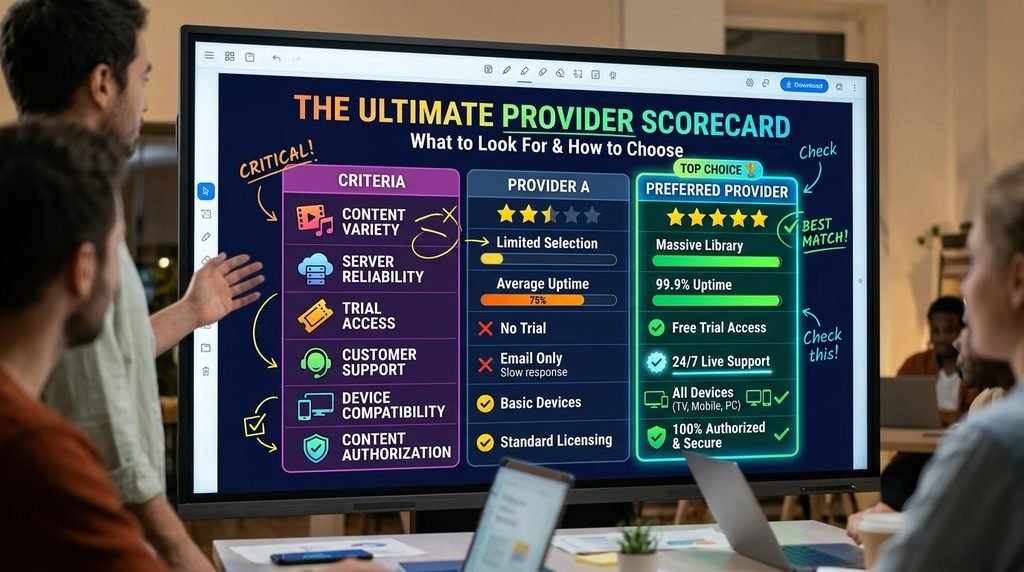
Choosing an IPTV subscription should involve more than comparing the number of advertised channels or the monthly price.
A lower price might be attractive, but it does not demonstrate content authorization, consistent availability, or responsive customer support.
The following checks offer a practical way to evaluate a provider before committing money.
The provider verification checklist
1. Verify the provider’s identity
Start with the website itself.
Look for a business name, contact information, customer support channel, and written service terms.
A provider should be able to explain who is responsible for your subscription and whom you should contact if your account stops working.
2. Ask about content distribution rights
This is particularly important when an IPTV provider advertises premium sports, major television networks, movies, or paid programming.
Ask how the provider is authorized to distribute the channels and content in your country.
Do not treat the ability to display a channel inside an application as proof of permission to distribute that channel.
The US Copyright Office explains that unauthorized use of copyrighted works can create copyright infringement issues. U.S. Copyright Office
3. Confirm Xtream Codes compatibility
Ask the provider directly whether your subscription includes Xtream Codes API credentials.
Confirm that the details will include:
- Server URL.
- Username.
- Password.
- Subscription expiration date.
Do not assume that every IPTV subscription automatically supports every login format.
4. Check the free-trial conditions
A trial allows you to examine the service before making a longer financial commitment.
Check whether the trial has restrictions on:
- Available channels.
- Video-on-demand content.
- Number of simultaneous connections.
- Supported devices.
- Trial duration.
A trial is useful for assessing technical compatibility, but it does not independently establish content licensing.
5. Read the refund policy
Understand the exact conditions under which you can request a refund.
Check the deadline, eligibility requirements, technical support requirements, and any exclusions.
For example, Xtreme HD IPTV’s FAQ currently advertises a seven-day money-back guarantee. Before relying on this statement, obtain the complete written conditions applicable to the specific plan. xtrmehdiptv.us
6. Compare the total price
A subscription advertised at a low monthly equivalent might require paying for an entire year upfront.
Compare the actual amount charged rather than relying only on a discounted monthly figure.
Also check whether an additional player activation fee, connection fee, or renewal charge applies.
7. Evaluate customer support
Before paying, send the provider a simple question about device compatibility or account activation.
Notice whether the answer is clear and whether the support channel is accessible.
An advertised 24/7 support service should be assessed through actual communication rather than assumed to be reliable.
A practical provider comparison scorecard
Use this table when evaluating two or more subscription providers.
| Evaluation criteria | What to look for |
|---|---|
| Business identity | Clear business and contact details |
| Content authorization | Documented rights for advertised content |
| Login compatibility | Confirmed Xtream Codes API support |
| Trial access | Transparent trial conditions |
| Refunds | Accessible written refund terms |
| Pricing | Clear total and renewal amount |
| Connections | Explicit simultaneous-device limits |
| Customer support | Working and responsive contact channel |
| Privacy | Clear account and data-handling policy |
Your pre-purchase checklist
0 of 7 completed
0%I verified the provider’s website and identity.I asked about authorization for the advertised content.I confirmed Xtream Codes API compatibility.I checked the trial conditions.I read the written refund policy.I confirmed the total price and number of connections.I verified the customer support contact.
Reset checklist
Why content authorization matters
IPTV technology itself is not proof that a service has permission to distribute the programming it advertises.
In the United States, the Protecting Lawful Streaming Act of 2020 increased criminal penalties for providers who willfully and for commercial advantage or private financial gain illegally stream copyrighted material. The USPTO explains that the law targets providers of such services, not ordinary users simply because they use streaming technology. USPTO
The relevant question when purchasing a subscription is whether the provider is authorized to distribute the actual content in your region.
This is why a clear licensing explanation and verifiable business information should matter more than a large channel-count advertisement.
What Happens After You Choose an IPTV Provider?
Once you have selected a provider and confirmed the subscription conditions, the next steps are checking compatibility, receiving your account details, and connecting the subscription to an appropriate player.
Requesting a trial
Start by identifying the device you plan to use.
Common options include Fire TV, Android TV, compatible Smart TVs, and mobile devices.
Request a trial through the provider’s published channel and confirm which login format it supplies.
For Xtreme HD IPTV, the free-trial request page provides a form for submitting a trial request. The page advertises test access without requiring a credit card. xtrmehdiptv.us
Before proceeding, verify the trial’s duration and limitations.
Receiving and using Xtream Codes credentials
After a provider confirms your subscription, follow its account-delivery instructions.
For an Xtream Codes-compatible player, the usual process is:
- Install a compatible IPTV player from an appropriate application source.
- Open the application and choose its Xtream Codes API login option.
- Enter the server URL supplied by your provider.
- Enter your username and password.
- Save the account and allow the application to retrieve the available playlist information.
If you use a Fire TV device, Amazon provides an official guide explaining how to locate and download applications through the Fire TV Appstore. Downloading a player from an application store does not itself provide an IPTV subscription.
The player and the provider are separate products, so always check their individual costs and terms.
Common purchasing and login mistakes
A few avoidable mistakes can cause problems after purchasing a subscription.
| Problem | What to check |
|---|---|
| Invalid username or password | Check spelling and capitalization |
| Server connection error | Verify the server URL and port |
| Expired subscription | Confirm the account expiration date |
| Empty channel list | Ask the provider to confirm account activation |
| Unsupported player | Check whether the application supports Xtream Codes API |
| Too many connections | Check the plan’s simultaneous-stream limit |
| Missing TV guide | Confirm EPG availability and refresh the playlist |
Keep your original activation email because it may contain the server address and account information needed for troubleshooting.
For additional assistance with subscription questions, use the published Xtreme HD IPTV contact page.
Frequently asked questions
Where can I buy Xtream Code IPTV services?
Purchase an IPTV subscription directly from a provider that confirms Xtream Codes API compatibility and can demonstrate its content distribution authorization. Review its pricing, trial, and refund conditions first.
Is Xtream Codes IPTV the same as an IPTV subscription?
No. Xtream Codes is an API and server-management technology. An IPTV subscription provides access to content, while a compatible player displays that content.
Does Xtreme HD IPTV support Xtream Codes login?
Its published FAQ states that subscriptions can be delivered using Xtream Codes API credentials or an M3U playlist URL. Confirm the login format for your chosen plan before purchasing.
Do I need to buy an Xtream Codes application?
Not necessarily. You need a compatible player application and a subscription from a provider. Some applications are free, while others charge separate activation or subscription fees.
Can I test an Xtream Codes IPTV subscription before paying?
Some providers offer trial access. Xtreme HD IPTV publishes a free-trial request page, but you should confirm the trial duration, device limits, and available features before requesting access.
Is every IPTV service using Xtream Codes legal?
No. The login technology does not establish whether a provider has permission to distribute its content. Check the provider’s content rights and applicable regional requirements.
Next-step block
Ready to compare subscription options?
Review the available Xtreme HD IPTV plans before choosing a duration or number of simultaneous connections. Start with the trial conditions and confirm the details of the package you intend to purchase.
Explore Xtreme HD IPTV pricing
