


Watch Live TV Online Free: 6 Practical Options in the US
To watch live tv online free in the United States, start with a legitimate ad-supported platform or a broadcaster’s own live stream—not a random website promising every premium channel for nothing. This guide compares six practical routes, explains what free streaming includes, and shows how to check availability before installing an application.
Quick Answer
You can watch live TV online free through platforms such as Pluto TV, The Roku Channel, Sling Freestream, Samsung TV Plus, local PBS livestreams, and free live-news services. Most offer selected channels without a monthly subscription, although advertisements, geographic restrictions, and device compatibility can vary.
Table of Contents
What Does Free Live TV Online Actually Mean?
Free live television streaming allows viewers to watch scheduled television broadcasts over an internet connection without paying a traditional monthly television subscription. Many services use advertising to fund their content, while others provide selected broadcasts through official network websites.
Understanding FAST streaming
FAST stands for Free Ad-Supported Streaming Television.
Unlike conventional on-demand platforms, FAST services provide channels with scheduled programming. Viewers can browse a channel guide and select whatever is currently broadcasting.
Common programming categories include:
- National and international news.
- Movies and classic television.
- Entertainment and reality shows.
- Food, travel, and lifestyle programming.
- Selected sports and special-interest channels.
FAST services are particularly useful for viewers who enjoy traditional television channel surfing but do not want another monthly bill.
For additional comparisons, see our guide to free live-streaming options.
Free streaming versus paid television
Not every service that advertises online television is free.
Some applications offer limited free channels but require a separate subscription for premium programming. Others provide temporary free trials that automatically transition into paid plans unless canceled.
It is useful to distinguish three categories:
| Category | How it works | Typical cost |
|---|---|---|
| FAST streaming | Scheduled channels supported by advertising | No subscription fee |
| Free broadcaster streams | Official news or television livestreams | Usually free for eligible content |
| Subscription television | Paid access to premium channels and events | Monthly or annual fee |
Understanding these differences prevents confusion when comparing television applications.
What Are the 6 Best Ways to Watch Live TV Online Free?
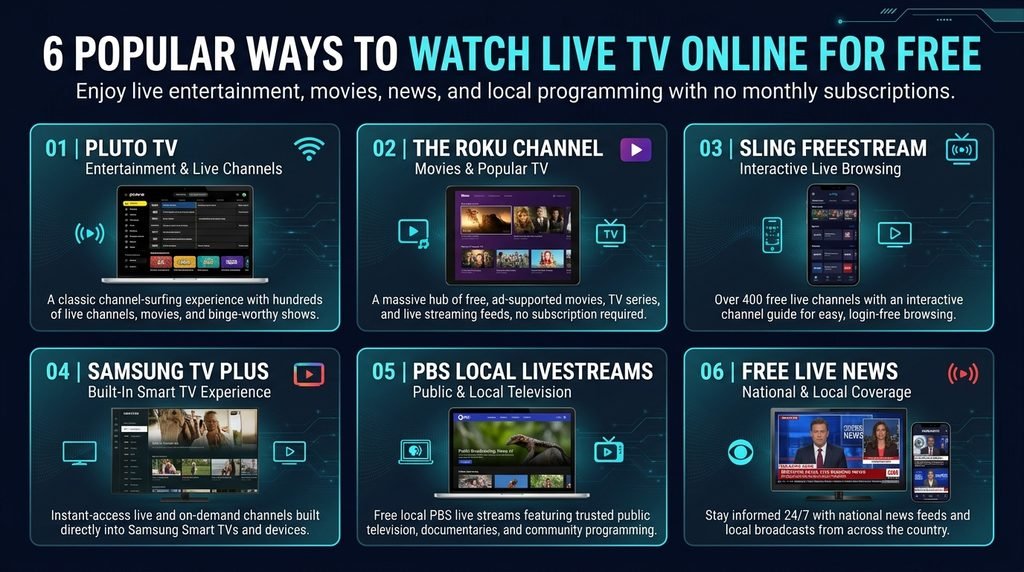
The following six options are useful starting points for US viewers. They are evaluated using publicly accessible platform information rather than invented hands-on performance results.
1. Pluto TV – Free Live Entertainment
Pluto TV is a useful starting point for viewers who prefer a traditional television-style channel guide.
Its official website offers a live-TV section with scheduled programming and channels covering several entertainment categories.
You can visit the official Pluto TV live-TV page to browse its current selection.
Best for:
- Movies and entertainment.
- Classic television programming.
- News and lifestyle channels.
- Viewers who enjoy scheduled programming.
Channel availability and programming can change, so check the live guide before choosing a particular channel.
2. The Roku Channel – A Large Free Channel Selection
The Roku Channel provides free live television alongside movies and on-demand entertainment.
Roku currently advertises more than 500 free live-TV channels, covering areas such as news, food, weather, sports, and entertainment.
Its official live-TV guide is a useful place to explore the available selection.
The Roku ecosystem also provides options through its streaming devices, televisions, and supported applications.
Best for:
- Viewers looking for a large live-channel selection.
- Households already using Roku.
- Free entertainment without a conventional cable package.
Remember that the channel lineup and supported features can change.
3. Sling Freestream – Free Channels Without a Subscription
Sling Freestream is a free ad-supported television offering from Sling TV.
Its current official page advertises more than 600 free channels and states that users can begin streaming without an account.
Available programming includes news, entertainment, movies, and selected sports-related content.
Visit Sling Freestream to access its current free offering.
Best for:
- Viewers interested in a large channel guide.
- News and entertainment programming.
- People who want to explore free television before considering paid packages.
Not every channel associated with Sling’s paid television service is included in Freestream.
4. Samsung TV Plus – Free Television on Supported Samsung Devices
Samsung TV Plus is another option for people using compatible Samsung products.
The official platform lists entertainment, news, sports, movies, and other programming categories. Its service is presented as free entertainment across supported Samsung devices.
Visit the Samsung TV Plus website to explore its channels and device availability.
Best for:
- Compatible Samsung Smart TV owners.
- People who want television channels without installing a separate streaming box.
- News, entertainment, and selected sports programming.
Device compatibility and regional availability should be checked before relying on the platform.
5. Local PBS Livestreams – Public Television Online
PBS provides another way to access live television without purchasing a cable subscription.
Viewers can watch their local PBS station’s livestream through the PBS website when that station offers the service and the viewer is inside the permitted broadcast area.
According to PBS Help, the local livestream does not require a donation or payment, although geographic restrictions apply.
Read the official PBS livestream and cost information.
Best for:
- Educational programming.
- Public affairs and documentaries.
- PBS NewsHour and other available programming.
- Viewers interested in their local public television station.
One limitation is that not every local PBS station offers a livestream.
6. Free Live News Services – CBS News and NewsON
If your main interest is news rather than general entertainment, official news streaming platforms can be particularly useful.
CBS News 24/7 provides a free live news streaming service through its website and supported applications.
You can access the CBS News live streaming page to explore its available feeds.
Another option is NewsON, which provides free live local news, previous newscasts, and local news clips from participating US stations.
Its website currently advertises more than 285 station partners. Visit NewsON to check available local coverage.
Best for:
- Breaking news.
- National and local reporting.
- Weather updates and regional coverage.
- Viewers who primarily want live news rather than a full television package.
Original Decision Guide: Which Free Live TV Service Should You Choose?
The right platform depends on what you want to watch, rather than simply which company advertises the largest number of channels.
The following decision guide is based on the services’ published platform information as reviewed on November 15, 2026. It is not a personal performance test.
| Your viewing priority | First platform to investigate | What to verify |
|---|---|---|
| Entertainment and channel surfing | Pluto TV | Current live schedule |
| Broad free channel selection | The Roku Channel | Device and regional access |
| Large free channel guide | Sling Freestream | Current channel lineup |
| Samsung television viewing | Samsung TV Plus | Supported device |
| Local public television | PBS | Local station coverage |
| Local and national news | NewsON or CBS News 24/7 | Available feeds in your area |
Important: Channel counts are not directly comparable. Some platforms combine live channels with on-demand content, while others count individual regional feeds or specialized channels differently.
The best choice is the service that actually carries the programming you intend to watch.
How Do You Choose the Right Free Live TV Platform?
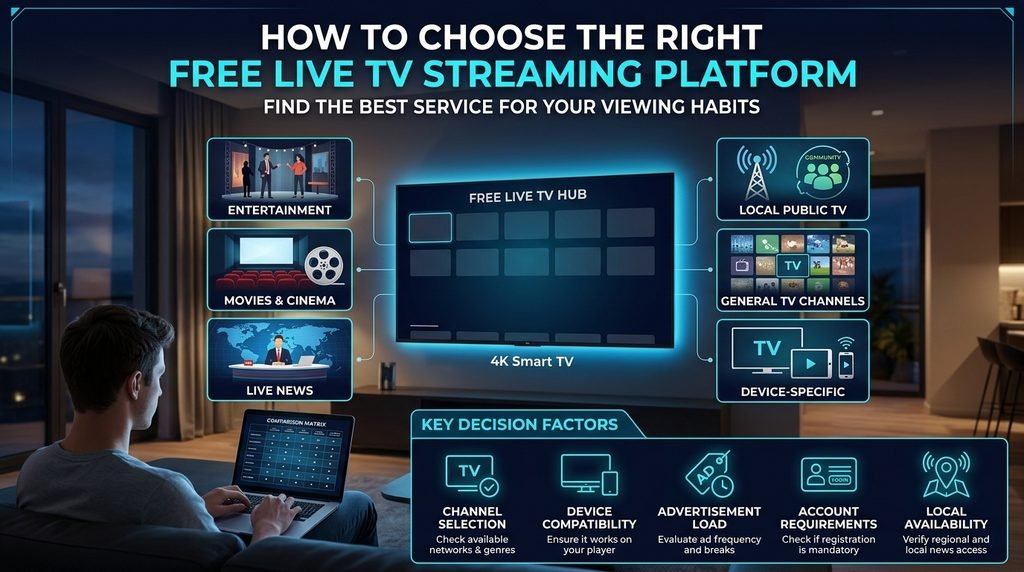
Before downloading an application, consider three basic requirements.
Device compatibility
Not every streaming service supports every television or streaming device.
Check whether the platform works on your preferred equipment:
- Amazon Fire TV and Fire TV Stick.
- Roku streaming players and compatible televisions.
- Samsung Smart TVs.
- Android TV and Google TV.
- Windows and macOS browsers.
- iPhone and Android smartphones.
For more device-specific information, explore our live-TV apps guide for Firestick and Android TV.
Channel availability
A platform may offer hundreds of channels without carrying the exact station you want.
Check the actual live-TV guide for your favorite news networks, regional stations, entertainment categories, and sporting events.
Do not rely exclusively on promotional descriptions or headline channel counts.
Account requirements and advertisements
Some free services allow immediate playback, while others require registration for certain features.
Also expect advertising interruptions on many free platforms. That is a common way ad-supported streaming services finance their programming.
Before registering, check whether the application requests payment details and whether a displayed offer is a genuine free service or a limited promotional trial.
Can You Watch Local Channels and Live Sports for Free?
Yes, selected local broadcasts and sports-related programming can be available without a paid subscription, but complete access is not guaranteed.
Local television broadcasts
Local television availability depends on the broadcaster, your location, and its streaming agreements.
PBS provides local livestreams in participating broadcast areas, while NewsON aggregates live local news from participating stations.
For a broader look at US television access and device options, see our USA live-TV guide.
An over-the-air television antenna is another possible way to receive local broadcast channels without a monthly subscription. However, an antenna is not online streaming, and reception depends on your location and equipment.
Sports and premium programming
Free platforms occasionally provide sports-related channels, coverage, highlights, and selected live events.
However, viewers should not assume that a free application includes every NFL, NBA, MLB, NHL, or international sporting event.
Broadcasting rights determine where individual events can be viewed. Check the official competition or broadcaster website for the current schedule and access requirements.
How Can You Start Streaming Live TV?
Getting started does not require a complicated home entertainment setup.
Follow these practical steps:
- Choose your platform. Select one of the official services according to the programming you want to watch.
- Visit the official website or application store. Avoid downloading unknown installation files from unrelated websites.
- Check your device compatibility. Confirm that the application supports your television, streaming player, smartphone, or computer.
- Open the live-TV guide. Browse the available channels and select a broadcast.
- Check the playback requirements. Follow any location, account, or sign-in instructions displayed by the official provider.
What if the live stream keeps buffering?
Streaming interruptions can have several causes.
Try the following basic troubleshooting actions:
- Restart the streaming application.
- Check whether other websites and applications load normally.
- Restart your router if your connection is experiencing problems.
- Move your device closer to the Wi-Fi router.
- Reduce the selected video quality when the application allows it.
- Check whether the broadcaster is experiencing a service interruption.
Avoid assuming that every buffering problem comes from the television provider. Your home network, device, application, and the stream itself can all affect playback.
Are Free Live TV Streaming Websites Safe?
The safest starting point is an official broadcaster website, a recognized streaming platform, or an application downloaded from an authorized application store.
Be cautious of unfamiliar websites that promise thousands of premium channels without clearly identifying their sources.
Warning signs include:
- Unexpected requests to download APK files.
- Browser extensions required to unlock a television channel.
- Payment-card information requested for an advertised free stream.
- Unexplained redirects or suspicious download buttons.
- No identifiable broadcaster, rights holder, or operating organization.
Understanding copyright and streaming authorization
Free access does not automatically mean that a stream is authorized.
In a July 2019 response, the US Copyright Office explained that unauthorized streaming can implicate copyright holders’ public-performance rights.
You can consult the United States Copyright Office’s letter on unauthorized streaming.
The practical approach is to use official applications and broadcasters’ own websites, check the applicable terms, and avoid assuming that a website has permission to distribute every channel it displays.
Where Does Xtreme HD IPTV Fit Into the Picture?
Xtreme HD IPTV is a separate offering from the free ad-supported platforms discussed in this guide.
The publisher provides a separate Xtreme HD IPTV pricing page, so the service should be evaluated as a paid subscription option rather than presented as a zero-cost FAST application.
Before purchasing any IPTV subscription, readers should independently review its current pricing, supported devices, cancellation conditions, and information about content-distribution authorization.
This distinction helps readers compare free live television and subscription-based IPTV without confusing their costs or access conditions.
Frequently Asked Questions

Can I watch live TV online free without creating an account?
Yes, on some platforms. Sling Freestream currently says no account is required; other apps may ask you to sign in for selected features or content. Check the current sign-in requirements on the official service page.
Which free service has the most live channels?
Channel counts change and are not directly comparable. On November 15, 2026, Sling Freestream advertised 600+ free channels, while Roku advertised 500+ free live channels. Check each live guide for the lineup you need.
Can I watch my local PBS station online for free?
Sometimes. PBS says local livestreams are free, but you must be inside the station’s service area and not every PBS station offers a stream. Check your local station’s availability first.
Can I watch live sports for free?
You may find selected sports channels, highlights, or events on free services, but full access to major league games often depends on broadcast rights and paid packages. Check the event’s official rights holder and schedule.
Are free live TV websites safe to use?
The lower-risk starting point is an official broadcaster website or app from a recognized app store. Avoid unknown APKs, browser extensions, payment requests for supposedly free streams, and pages with unclear ownership or content sources.
Is Xtreme HD IPTV a free live-TV service?
No. Xtreme HD IPTV is listed separately on this publisher’s paid pricing page, so it should not be confused with the free services compared here. Review current terms and verify content authorization before subscribing.
Sources and Further Reading
The following primary sources support the platform descriptions and access limitations in this article:
- Pluto TV – Watch Free Live TV
- Roku – Watch Live TV
- Sling TV – Freestream
- Samsung TV Plus – Official Platform
- PBS Help – How Much Does It Cost to Watch PBS?
- CBS News – Live Streaming
- NewsON – Official Live Local News
- US Copyright Office – Unauthorized Streaming
Editorial Methodology
Publisher: Xtreme HD IPTV
Byline: Robert M. (existing publisher byline).
Last updated: November 15, 2026.
Research basis: Review of official streaming-platform pages, broadcaster information, PBS documentation, and US Copyright Office material.
Evaluation criteria: Advertised cost, live-channel access, account requirements, geographic restrictions, device availability, and content limitations.
This article is based on documented information and editorial research. No independent application performance tests, internet speed measurements, or subscription-service rights audits are claimed.
